Page 1 of 1
Round surfaces
Posted: Mon Oct 29, 2007 10:53 am
by Flanker27
I'm new here and I have another question. I worked wit RF for some time and it was fine. Now I made a model in True Space 3.2, it's a table which looks like a half of a sphere, it looks nice and round in there. But when I imported it in RF, in a game it consists of rectangles and looks awfully. I tried to change various options, but it didn't help. Is there a way to get models with rounded surfaces in RF?
Posted: Mon Oct 29, 2007 11:54 pm
by SithMaster
Can you take some pics of the problem please?
Posted: Tue Oct 30, 2007 12:30 am
by darksmaster923
idk rf actuall supports meshsmoothing, so cover it up with a texture.
Posted: Tue Oct 30, 2007 12:59 am
by zany_001
yah, that would be because truespace can do a smooth shader, which i think RF cant, but RF2 probably can.
Posted: Thu Nov 01, 2007 12:49 pm
by Flanker27
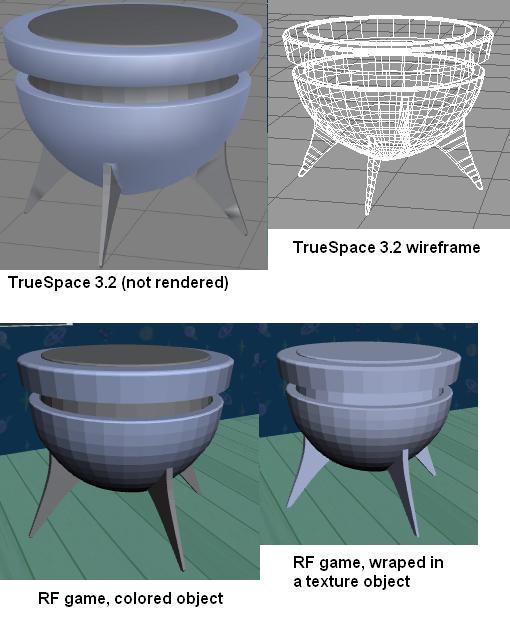
I worked more with this thing, so there is a screenshot. Like I told I changed everything I could. Interesting that a human figure looks smooth, but my objects and textures look like they are not rendered. I really wouldn't want to see such graphics in my game, I hope you will be able to help me.
RF2 will be done in 2011, it doesn't exist yet, right?
Posted: Thu Nov 01, 2007 1:48 pm
by steven8
I have made rounded objects in anim8or, and had then be just fine in RF. That was years ago, so I don't recall exact details, but I believe I exported as 3ds, then took it into Milkshape3d and exported the bdy file, then made actors and used as staticmeshentities. Saying that, I believe it must have something to do with Truespace and how it handles meshes. Not that Truespace does something wrong, but it doesn't 'mesh' well with RF.
It will mean learning new interfaces for you, but try the same or similar object in anim8or/MIlkshape3d, and see how it looks:
http://www.anim8or.com
http://www.milkshape3d.com/
Posted: Thu Nov 01, 2007 2:03 pm
by scott
defenetly, i use milkshape and is no where near as bad as that, it has to be something to do with the mesh smoothing, i havnt got a copy of RF to hand as i am at work but will try and find a soultion tonight.
Posted: Thu Nov 01, 2007 2:54 pm
by Flanker27
Thanks, I'll try to use different programs. I used TrueSpace 3.2 saved .cob and converted with Truegene to .act, it's very convenient, but, unfortunately, this way causes this smoothing problem. It would be hard to export in another way. I wish there was a way solve this problem, because TrueSpace is very easy and convenient to use.
Posted: Thu Nov 01, 2007 4:03 pm
by steven8
It is unique to every individual, but I've used Truespace 3.2 and found anim8or to be much friendlier and intuitive. The guy who created anim8or is a programmer for Nvidia, so he knows his stuff!
Posted: Fri Nov 02, 2007 11:35 pm
by steven8
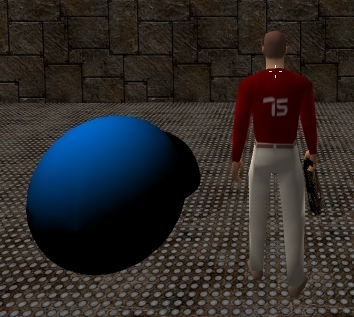
Here is a quick shot of a quick ball made in Milkshape, then bdy, then actor, then staticentityproxy.
Posted: Mon Nov 05, 2007 1:08 pm
by Flanker27
Thanks for help, I worked on it several more days and finally imported this sphere. I found that I can import textured objects through milkshape .bdy - actor studio .act and it will look OK. The bad thing is that .bdy format seems don't support colors and not textured, just colored things imported through truegene look faceted in RF. All this means that I have to redo my models and color only with textures, it's not convenient, because it's better to do many things with colors. May be someone could find a way or make changes in some program to solve this problem? It's not necessary, just would be more convenient.
Posted: Tue Nov 06, 2007 9:31 am
by steven8
Hey, that looks good! Yeah, you gotta have textures. painted surfaces don't work. Your moving right on, though.

Posted: Tue Nov 06, 2007 3:42 pm
by Flanker27
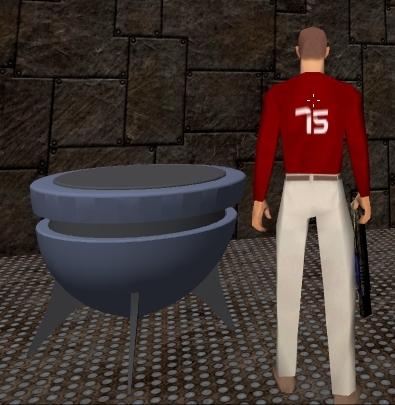
I colored the table with two small (4X4) textures and now it looks well. Objects that don't require smoothed surfaces still can be imported using truegene. Though it would be good that .bdy format supported colors or truegene supported smoothing. I hope that in RF2 will be a lot more things, like various formats support, transparency of materials, shininess etc.
Right now I really, really need manuals on scripting. I'm making an adventure game and I don't even know yet how to script use key. Books on the site explain how to make a shooter, but I would like to know how to script more complicated things, like to use one object on another. Are there any other manuals?
Posted: Wed Nov 07, 2007 9:14 am
by Flanker27
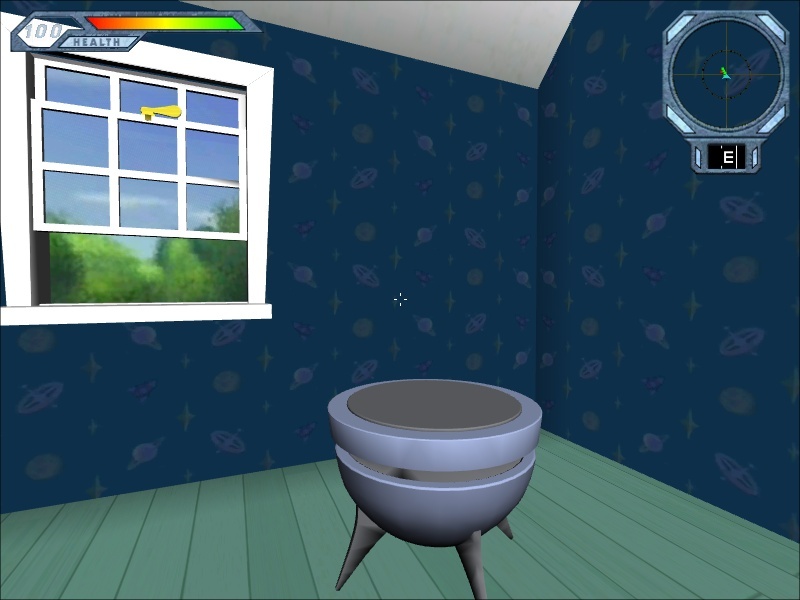
Fortunately, I've made a mistake about colors, I bought milkshape and after some time was able to import colored (not textured) objects in RF. So, when somebody might need it too, my export chain is - truespace, a colored and textured (and triangulated) object is exported as .x -> milkshape, bones, joints and animation could be added there, exporting as .bdy -> actor studio, compiling a ready to use actor. Unfortunately, the .bdy format doesn't support transparency, so I had to make glass as separate objects and make it a transparent actor in the level editor.
As you can see I made something nice with RF, it's a good game creation software after all. I just WISH there were more good manuals.
Posted: Wed Nov 07, 2007 12:09 pm
by QuestOfDreams
Unfortunately, the .bdy format doesn't support transparency,
The bdy format does, but milkshape does not support it in the exporter. Create a tga and use the tga2gbmp2 utility in the tools folder to replace the texture in question.